For candidates
Know exactly which skills stand between you and the job.
Upload your resume and the job link to get every requirement the posting names, split into what you already have and what you are missing, with an action plan for the gap.
- Skills named, not just scored
- Grouped by category
- An action plan you can download
How it works
Resume in, gap out
Paste the job link so the comparison runs against the actual posting rather than a generic job title. A gap list is only useful when it comes from the requirements you are being measured on.
- 1
Add your resume and the job link
Drop a PDF, DOC, or DOCX and paste the LinkedIn posting you are targeting.
- 2
Get compared
Your experience is parsed into skills and diffed against every requirement the posting names.
- 3
Work the list
See what matched, what did not, and which gaps to close first.
Reading your result
Two lists, one score
The score tells you where you stand. The lists tell you what to do, which is the part that changes the outcome.
Matched : what your resume already proves
Requirements the posting names that your experience evidences. If something you can do is not on this list, it is not on your resume clearly enough, and an ATS will miss it for the same reason.
Missing : what is not there yet
Requirements with nothing in your resume backing them. Some are worth learning, some are worth writing down properly, and the action plan says which is which.
What you get
Inside the analysis
Built to be acted on, not admired, so every line points at something you can change this week.
Readiness score
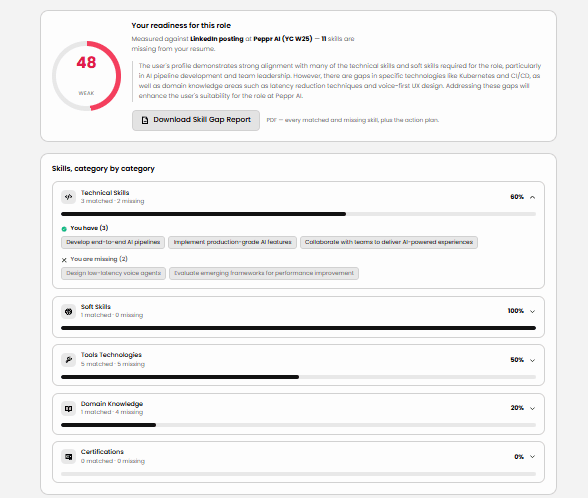
How much of the role you already cover, out of 100, weighted across every skill category.
Category breakdown
Technical skills, tools and technologies, soft skills, domain knowledge, and certifications each scored on their own, so you know whether it is one weak area or a spread.
Named skills, both ways
The matched and missing skills listed by name rather than summarised, because "add Kubernetes" is actionable and "improve technical depth" is not.
An action plan
What to build first, ordered by what moves the score most for this role.
Yours to keep
One click turns the whole analysis into a PDF: every named skill, both columns, and the plan. Built in your browser and downloaded to your device.
See it first
What the gap analysis looks like
A readiness score for the role, then every skill category opened up into what you have and what is missing, named, not summarised.
Run yours
Know your gap
Upload your resume and the job link. You get every skill the posting asks for, split into what you already have and what you are missing, plus what to do about it.
Drop your resume here
PDF, DOC, or DOCX · max 5 MB
Questions
Common questions
What does this actually tell me?+
Every skill the posting asks for, sorted into two lists: the ones your resume already evidences and the ones it does not. The skills are grouped by category (technical skills, tools and technologies, soft skills, domain knowledge, certifications), each with its own match percentage, so you can see whether the problem is one weak area or a spread.
How is this different from a fit score?+
A fit score answers "how close am I?" with a number. This answers "what is missing?" with names. The Recruiter Report on /candidates is the one to send someone; this one is the one to work from.
What do I need to run it?+
Your email, your resume as a PDF, DOC, or DOCX under 5 MB, and ideally the LinkedIn link for the job you are targeting. Without the link you are compared against the roles matched to your resume instead of the one you actually want.
How long does it take?+
Resume parsing runs on the AI service and usually takes up to about three minutes; the skill comparison itself is quick. Keep the tab open. The progress list shows which stage it is on.
What is a readiness score out of 100?+
How much of what the role asks for your resume already covers, weighted across the categories. Above 75 means you are broadly ready and should focus on presentation; between 50 and 75 means there are real gaps worth closing before you apply; below 50 means the role is a stretch in its current shape.
A skill I have is listed as missing. Why?+
The comparison reads your resume, not your head, so a skill that is not written down cannot be matched. That is useful information in itself: an ATS and a recruiter will miss it for the same reason. Add it to your resume and re-run.
Can I keep the results?+
Yes. One click downloads the whole analysis as a PDF: the matched and missing skills named in full, the category scores, the action plan, and your readiness score. It is built in your browser and downloads to your device, so nothing is sent anywhere on your behalf. Unlike the Recruiter Report, this one is a working document rather than something to attach to an application.
Can I check more than one role?+
Yes. After the first run, use the role dropdown to compare against another matched role. You do not need to re-upload your resume.
What happens to the missing skills?+
The report ends with an action plan naming what to build first. On the AllyNerds platform, Discover keeps that plan against every role you are targeting and can quiz you on the missing skills to confirm you have actually closed them.
Want a report to send the recruiter instead? Generate a Recruiter Report.