For recruiters & hiring teams
Know how a candidate scores against the actual role before the first call.
Paste the job posting, upload the resume, and get a fit score backed by a requirement-by-requirement breakdown. No candidate account needed.
- Scores against the real posting
- Evidence for every number
- Two to three minutes per screen
How it works
Two steps, one screen
The job comes first, so the resume is always scored against the role you are actually hiring for never an auto-matched guess.
- 1
Add the job posting
Paste the LinkedIn job link. We read the posting and attach it to the candidate as their target role.
- 2
Upload the resume
Drop a PDF, DOC, or DOCX. The AI service parses experience, skills, and education out of it.
- 3
Read the breakdown
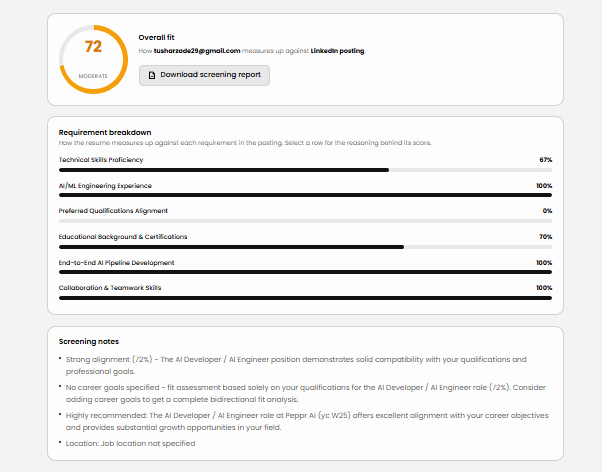
Get the overall fit score, per-requirement bars, and the reasoning behind each number.
Reading the result
What the overall fit score actually means
One number for the only question screening needs to answer, backed by the evidence behind it.
Overall fit: can they do the job?
How well the candidate meets the role’s stated requirements. Low means missing skills, experience, or credentials the posting asks for. This is the bar-clearing number.
Where the number comes from
Each requirement in the posting is scored against what the resume actually contains, then combined. Every category shows its own percentage and the reasoning behind it, so you can check the maths rather than trust it.
What you get
Evidence, not just a number
Requirement-by-requirement breakdown
Every category shows what the job description asked for, what the resume actually contains, and how the score was reached.
Scored against the real posting
The LinkedIn link is parsed into a concrete role, so you are not comparing a resume to a generic job title.
Weakest signals surfaced first
The screening notes lead with the lowest-scoring categories, the things you would want to probe in a first call.
Re-score without re-uploading
Once a resume is parsed, switch roles from the dropdown to see how the same candidate scores elsewhere.
See it first
What a finished screen looks like
The overall fit score, a bar for every requirement in the posting, and the screening notes that lead with the weakest signals.
Start a screen
Screen a candidate
Step 1 · Add the job posting
We read the posting and attach it to this candidate, so the resume is scored against the real role instead of an auto-matched guess.
Questions
Common questions
How does it work?+
Two steps. You paste the LinkedIn link for the role you are hiring for, which is read into a concrete posting and attached to the candidate, then you upload their resume. The resume is parsed into skills, experience, and education, and scored against every requirement in that posting. You get an overall fit score, a bar per requirement, and the reasoning behind each one, plus a PDF of the whole screen.
What do I need before I start?+
A LinkedIn job posting link and the candidate’s resume as a PDF, DOC, or DOCX under 5 MB. Nothing else. You do not need the candidate to have an AllyNerds account.
How long does a screen take?+
Adding the job posting is near-instant. Resume parsing runs on the AI service and typically takes up to about three minutes, so keep the tab open while it works.
What does the overall fit score measure?+
How well the candidate meets the role’s stated requirements, the bar-clearing question. It is built by scoring each requirement in the posting against what the resume actually contains, so every point is traceable to a category and its reasoning.
Can I screen the same candidate against several roles?+
Yes. Once a resume is processed, the role dropdown lets you re-score against any other matched posting without re-uploading anything.
What happens to the resume I upload?+
It is processed against the candidate email you enter, which becomes their id in the scoring pipeline. Use a scoped internal address if you do not want the analysis attached to a real candidate account.
Candidates can run their own version at the recruiter report page, which produces a shareable PDF from the same analysis.