Chrome extension
Know if a job fits before you apply.
AllyNerds Job Assistant scores the posting you are reading against your resume, shows the skills you are missing, and tailors your resume to the job, all in a side panel next to the page.
- Works where you job hunt
- Nothing sent until you ask
- Free with your AllyNerds account
How it works
Open a job. Press one button. Read the answer.
The extension recognizes the posting on the page, so there is nothing to copy or paste. Every step runs against your own resume.
- 1
Open a job posting
On LinkedIn, Indeed, Glassdoor and the other supported boards, AllyNerds buttons appear next to Apply.
- 2
Check your fit
Get a score for how well you match the job, the reasons behind it, and the skills the posting asks for that you have not shown yet.
- 3
Tailor and apply
Rewrite your resume for this job, download it as a PDF, and apply while the posting is still open.
What you get
Everything AllyNerds knows about the job, beside the job
Four answers in one side panel, in the order you need them.
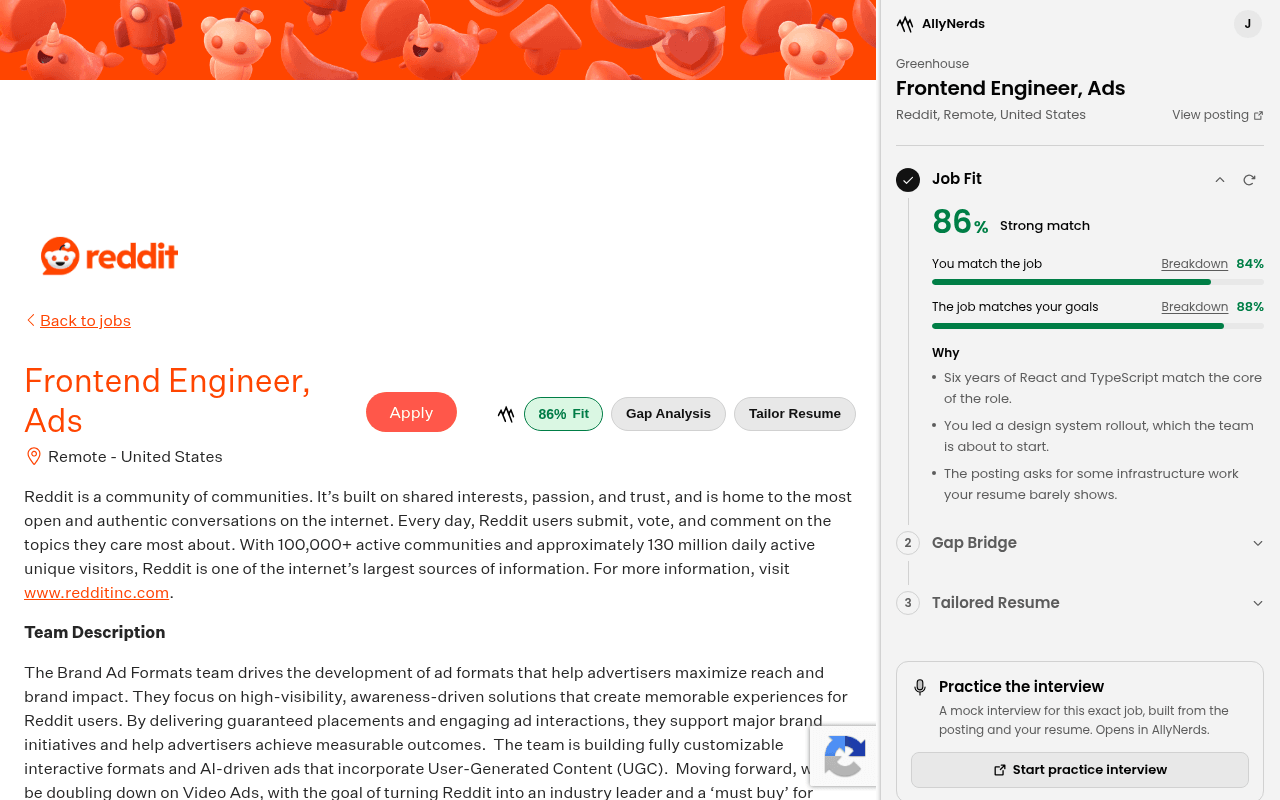
Job fit score
How well you match the job, and how well the job matches your goals, with a plain-language verdict and the reasons behind the number.
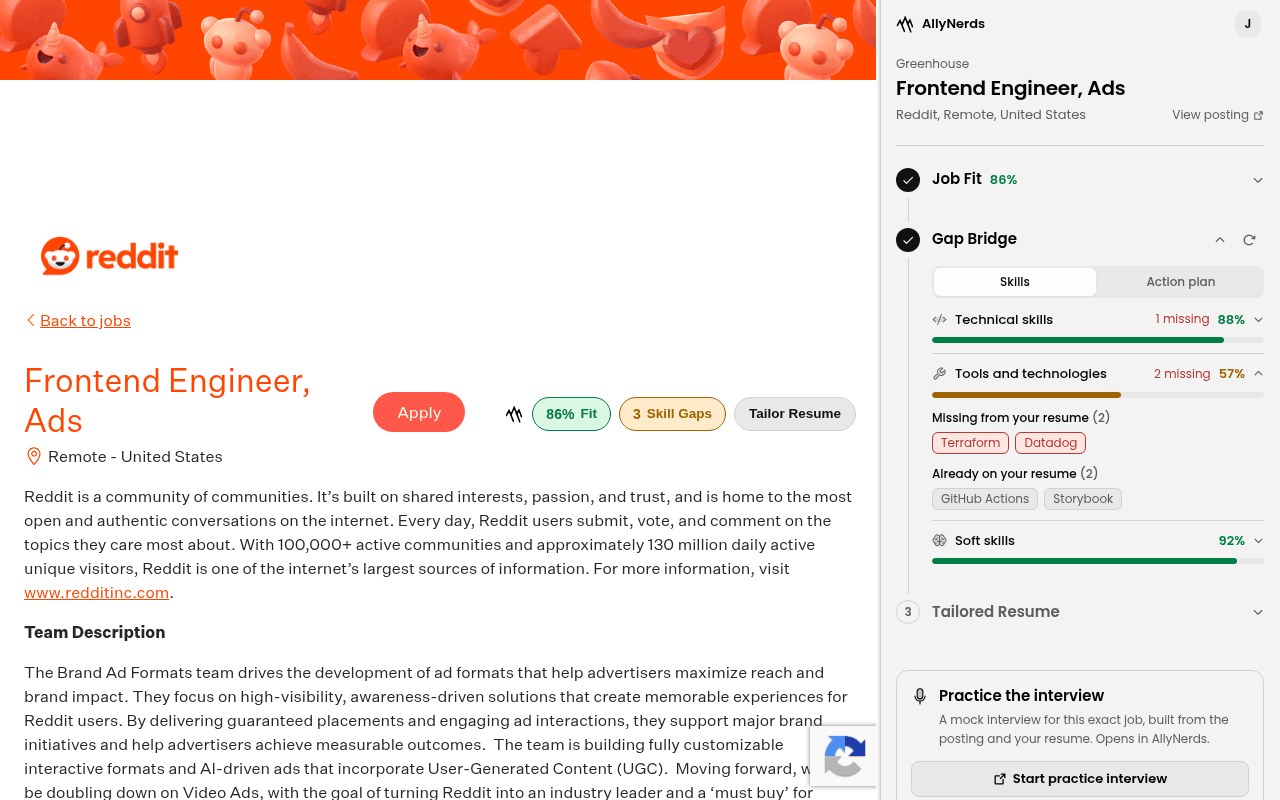
Skill gaps, named
Every skill the posting asks for, split into what your resume already shows and what is missing, plus an action plan for the gap.
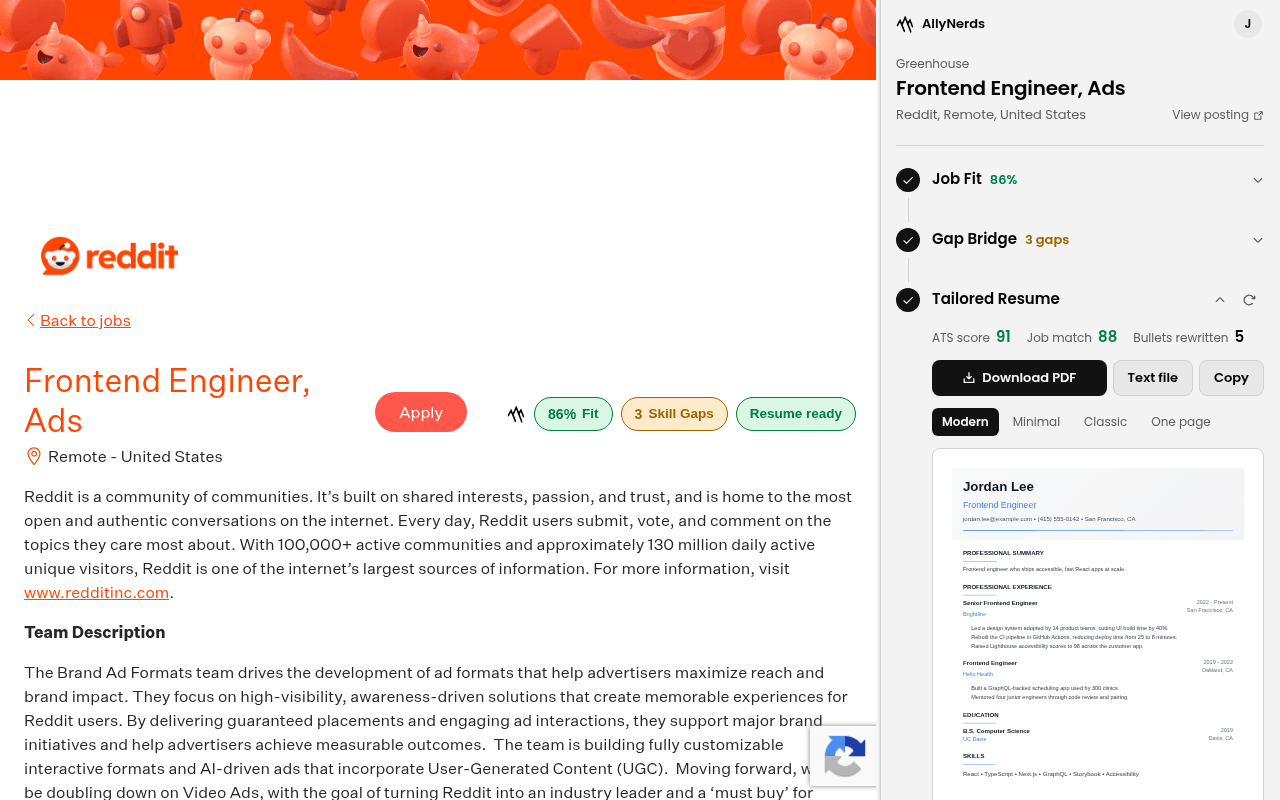
A tailored resume
Your resume rewritten around this posting, with an ATS score and a job match score. Download it as a PDF or text, or copy it.
Practice the interview
One click opens a mock interview for this exact job in AllyNerds, set up with the posting and your resume.
Recently checked
The jobs you analyzed, with their scores, so you can compare postings and come back to the best ones.
Scores right on the page
Your fit and gap count appear on the job board itself, and on search results too, so you can triage a list without opening every posting.
Where it works
16 job boards, plus company careers pages
Buttons appear on these sites automatically. Turn on company careers pages in the extension’s options to use it anywhere a job posting publishes standard job data.
- Indeed
- Glassdoor
- ZipRecruiter
- Monster
- Greenhouse
- Lever
- Ashby
- Workday
- Dice
- SimplyHired
- Wellfound
- Built In
- USAJobs
- SmartRecruiters
- Workable
See it first
The gap, named skill by skill
Missing skills are shown by name and grouped by category, next to the ones your resume already proves.
Privacy
It reads the job, not you
The extension is built to do one thing: help you judge and apply for the job in front of you.
Nothing is sent until you press a button
Opening a posting does not send it anywhere. Only running Check fit, Find gaps, Tailor resume or Practice does.
Never your other tabs
It reads the job posting on the page you are looking at, never your other tabs, form fields, passwords or browsing history.
Uses your existing sign-in
It uses the AllyNerds account you are already signed in to in this browser, and sends that sign-in only to allynerds.com.
Not sold, not used for ads
Your data is used only to run the analysis you asked for. It is never sold or used for advertising.
Get started
Set up in under a minute
The extension is in review for the Chrome Web Store and will be available to install here soon.
- 1
Add it to Chrome
Install AllyNerds Job Assistant from the Chrome Web Store and pin it to your toolbar.
- 2
Sign in and add your resume
Sign in to AllyNerds in the same browser and upload your resume once.
- 3
Open a job
Go to any supported job board and press Check Job Fit next to Apply.
Questions
Common questions
Which job sites does it work on?+
LinkedIn, Indeed, Glassdoor, ZipRecruiter, Monster, Greenhouse, Lever, Ashby, Workday, Dice, SimplyHired, Wellfound, Built In, USAJobs, SmartRecruiters and Workable. You can also turn on detection for any company careers page in the extension's options; it then looks for the standard job data those pages publish.
Do I need an AllyNerds account?+
Yes, a free one. The extension uses the AllyNerds account you are signed in to in the same browser, so there is no separate login. Upload your resume once and every analysis uses it.
What does it read on the page?+
Only the job posting you are looking at, and only when you press a button. It never reads your other tabs, form fields, passwords or browsing history.
What gets sent to AllyNerds?+
When you run a step, the posting’s title, company, location, description and link go to AllyNerds to be analyzed against your resume. Nothing is sent until you ask, and nothing is sold or used for advertising.
Is it the same as the tools on the AllyNerds site?+
It runs the same Job Fit, Gap Bridge and ResumeIQ analysis, but in Chrome’s side panel next to the posting, so you skip copying links and job descriptions between tabs.
Which browsers are supported?+
Google Chrome, version 116 or newer, on Windows, macOS, Linux and ChromeOS.
Is it free?+
Yes. The extension is free to install and uses your AllyNerds account.
Stop guessing which jobs to apply to
Check your fit, see your gaps and tailor your resume without leaving the posting.